FAQ
What do I do if the workflow won’t run because the directory is “locked”?
snakemake --profile profiles/tutorial --unlock
How do I troubleshoot workflow errors?
Start with investigating the logfile of the rule that failed.
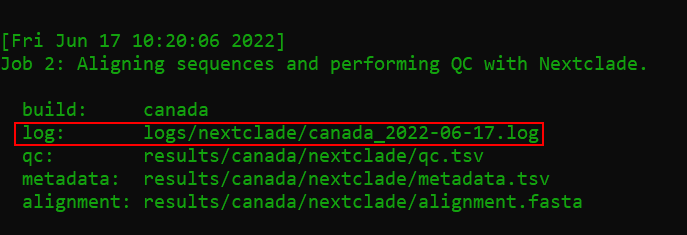
Issue submissions are welcome and greatly appreciated!
How do I troubleshoot SLURM errors?
If the workflow was dispatched with
scripts/slurm.sh, the master log will be stored at:logs/ncov-recombinant/ncov-recombinant_<date>_<jobid>.log
Tip: Display log of most recent workflow:
cat $(ls -t logs/ncov-recombinant/*.log | head -n 1)
Why is the pipeline exiting with
ConnectionErrororHTTPSError?Network connection issues can occur in the rule
sc2rf_recombinants, where the LAPIS API is used to query covSPECTRUM in order to identify the most likely parental lineages. For troubleshooting and solutions, please see Issue #202 and Issue #201.How do I cleanup all the output from a previous run?
snakemake --profile profiles/tutorial --delete-all-output
Why are some lineages called
X*-like?A cluster of sequences may be flagged as
-likeif one of following criteria apply:The lineage assignment by Nextclade conflicts with the published breakpoints for a designated lineage (
resources/breakpoints.tsv).Ex. An
XEassigned sample has breakpoint11538:12879which conflicts with the publishedXEbreakpoint (ex. 8394:12879). This will be renamedXE-like.
The cluster has 10 or more sequences, which share at least 3 private mutations in common.
Ex. A large cluster of sequences (N=50) are assigned
XM. However, these 50 samples share 5 private mutationsT2470C,C4586T,C9857T,C12085T,C26577Gwhich do not appear in trueXMsequences. This will be renamedXM-like. Upon further review of the reported matching pango-designation issues (460,757,781,472,798), we find this cluster to be a match toproposed798.
Why are some lineages classified as “positive” recombinants but have no information about their parents or breakpoints?
There are 8 recombinant lineages that can be identified by
nextcladebut cannot be verified bysc2rf. When sequences of these lineages are detected bynextclade, they will be automatically passed (“autopass”) throughsc2rfas positives. As a result, these sequences will typically haveNAvalues under columns such asparents_cladeandbreakpoints.XN| Issue #137 | Breakpoints lie at the extreme 5’ end of the genome.XP| Issue #136 | Breakpoints lie at the extreme 3’ end of the genome.XAN| Issue #109 | Excessive noise/intermissions from conflicting reversions, fails intermission-allele ratio.XAR| Issue #106 | Breakpoints lie at the extreme 5’ end of the genome.XAS| Issue #86 | The first parent cannot be differentiated betweenBA.5andBA.4(without using deletions).XAV| Issue #104 | Excessive noise/intermissions from conflicting reversions, fails intermission-allele ratio.XAZ| Issue #87 | There are no “diagnostic” mutations from the second parent (BA.2).XBK| Issue #106 | Breakpoints lie at the extreme 5’ end of the genome.
The setting for auto-passing certain lineages is located in
defaults/parameters.yamlunder the sectionsc2rf_recombinantsandauto_pass.How are the immune-related statistics calculated (ex.
rbd_level,immune_escape,ace2_binding)?These are obtained from
nextclade, theNextstrainteam, and Jesse Bloom’s group:How do I change the parameters for a rule?
Find the rule you are interested in customizing in
defaults/parameters.yaml. For example, maybe you want recombinants visualized bydivisionrather thancountry.# --------------------------------------------------------------------------- # geo : Column to use for a geographic summary (typically region, country, or division) - name: linelist geo: country
Then copy over the defaults into your custom profile (
my_profiles/custom/builds.yaml), and adjust the yaml formatting. Note that- name: linelisthas becomelinelist:which is idented to be flush with thesequences:parameter.- name: custom metadata: data/custom/metadata.tsv sequences: data/custom/sequences.fasta linelist: geo: division
How do I include more of my custom metadata columns into the linelists?
By default, the mandatory columns
strain,date, andcountrywill appear from your metadata.Extra columns can be supplied as a parameter to
summaryin yourbuilds.yamlfile.In the following example, the columns
division, andgenbank_accessionwill be extracted from your inputmetadata.tsvfile and included in the final linelists.
- name: controls
  metadata: data/controls/metadata.tsv
  sequences: data/controls/sequences.fasta

  summary:
    extra_cols:
      - genbank_accession
      - division
Where can I find the plotting data?
A data table is provided for each plot:
Plot:
results/tutorial/plots/lineage.pngTable:
results/tutorial/plots/lineage.tsvThe rows are the epiweek, and the columns are the categories (ex. lineages)
Why are “positive” sequences missing from the plots and slides?
First check and see if they are in
plots_historicalandreport_historicalwhich summarize all sequences regardless of collection date.The most likely reason is that these sequences fall outside of the reporting period.
The default reporting period is set to 16 weeks before the present.
To change it for a build, add custom
plotparameters to yourbuilds.yamlfile.
- name: custom
  metadata: data/custom/metadata.tsv
  sequences: data/custom/sequences.fasta

  plot:
    min_date: "2022-01-10"
    max_date: "2022-04-25" # Optional, can be left blank to use current date